Payment Integration Overview
Payment Flow Summary
The Al Qaseh Payment Gateway supports two main types of payment integration:
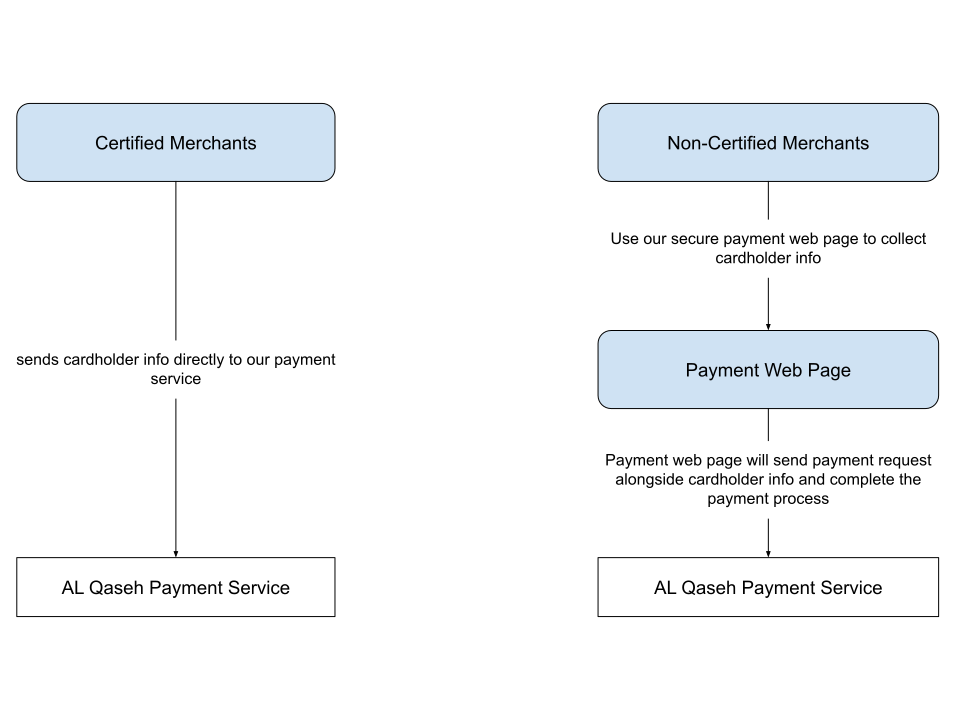
- PCI-DSS Certified Merchants: Direct API-based payments, giving full control over the payment process.
- PCI-DSS Non-Certified Merchants: Secure payment page managed by Al Qaseh, redirecting customers to enter their card details securely.
Both Certified and Non-Certified merchants can use Al Qaseh's APIs to initiate, track, and manage payment flows.
Features Overview
- Create Payment Context: Each transaction starts with creating a Payment Context. This is a set of information that includes order ID, amount, currency, and URLs for redirection and webhook notifications.
- Process Payment: Depending on merchant type:
- Certified Merchants: Direct API to handle card data securely.
- Non-Certified Merchants: Use a secure payment page.
- Webhook Notifications: Real-time notifications to inform merchants of payment status.
- Redirection URLs: Redirect customers after payment completion.
Supported Payment Flows
The integration workflow for the Al Qaseh Payment Gateway involves a series of steps depending on whether you are a Certified or Non-Certified merchant. This section provides a straightforward overview of how to create, process, and manage payments, ensuring a seamless experience for both developers and end-users.
PCI-DSS Certified Merchant Workflow
-
Create Payment Context:
- Start by creating a payment context with essential details like
amount,currency,order_id,redirect_url, andwebhook_url. - This context serves as the basis for all further actions.
- Start by creating a payment context with essential details like
-
Collect Card Details:
- Collect the customer’s card information securely. Ensure that all sensitive data is handled in compliance with PCI-DSS standards.
-
Process Payment:
- Submit the payment using the provided payment context.
- Monitor the status of the transaction as it progresses.
-
Redirect Customer:
- Redirect the customer to the specified redirect URL upon payment completion, guiding them to the appropriate "Thank You" or error page.
-
Handle Notifications:
- Receive webhook notifications to keep your backend updated about the payment status (
Success,Failed, etc.). - Update your order records and inform the customer as needed.
- Receive webhook notifications to keep your backend updated about the payment status (
PCI-DSS Non-Certified Merchant Workflow
-
Create Payment Context:
- Set up the payment context, specifying details like
amount,currency,order_id,redirect_url, andwebhook_url.
- Set up the payment context, specifying details like
-
Redirect Customer to Secure Payment Page:
- Redirect the customer to the secure payment page hosted by Al Qaseh.
- The customer enters their payment details directly on this page, ensuring maximum security and reducing your PCI burden.
-
Redirect Customer:
- Redirect the customer to the designated redirect URL after they complete payment, providing them with a confirmation or error page.
-
Handle Notifications:
- Upon payment completion, receive a webhook notification with the transaction details.
- Update your backend and order status accordingly.
Payment Status Management
-
Webhook Notifications:
- Webhooks inform you in real-time about the status of the payment.
- These notifications help keep your system synchronized and updated, especially for backend operations.
-
Redirects for User Experience:
- Redirect URLs ensure that your customer ends up on the correct page after completing payment.
- Use these redirects to provide a seamless and informative experience, whether payment was successful or failed.
Summary
- PCI-DSS Certified Merchants: Handle the entire payment process directly through API calls, giving full control over payment collection.
- PCI-DSS Non-Certified Merchants: Use a secure payment page hosted by Al Qaseh, avoiding the complexities of handling card details directly.
In both workflows, using webhooks for backend updates and redirects for guiding customers provides a consistent and streamlined integration experience.
The integration paths are designed to be simple and consistent, allowing developers to easily add payment capabilities to their applications, irrespective of the merchant type.