Payment API
Using the previous workflows and features as a foundation, this section will dive into the specifics of the Payment API, including the endpoints, parameters, and responses involved in creating, processing, and managing payments
Test Environment
sandbox environment provides a safe space to test all integration points before going live.
Test Credentials:
| Name | Value | Description |
|---|---|---|
| API | https://api-test.alqaseh.com/v1 | Test API host url |
| Client id | public_test | Test Merchant Username |
| Client Secret | Lr10yWWmm1dXLoI7VgXCrQVnlq13c1G0 | Test Merchant password |
| Card PAN | 5341432900077803 | Card PAN, 16 digits |
| Card CVV2 | 971 | |
| Card EXP | 01-2027 | Card Expiration date |
Creating Payment Context
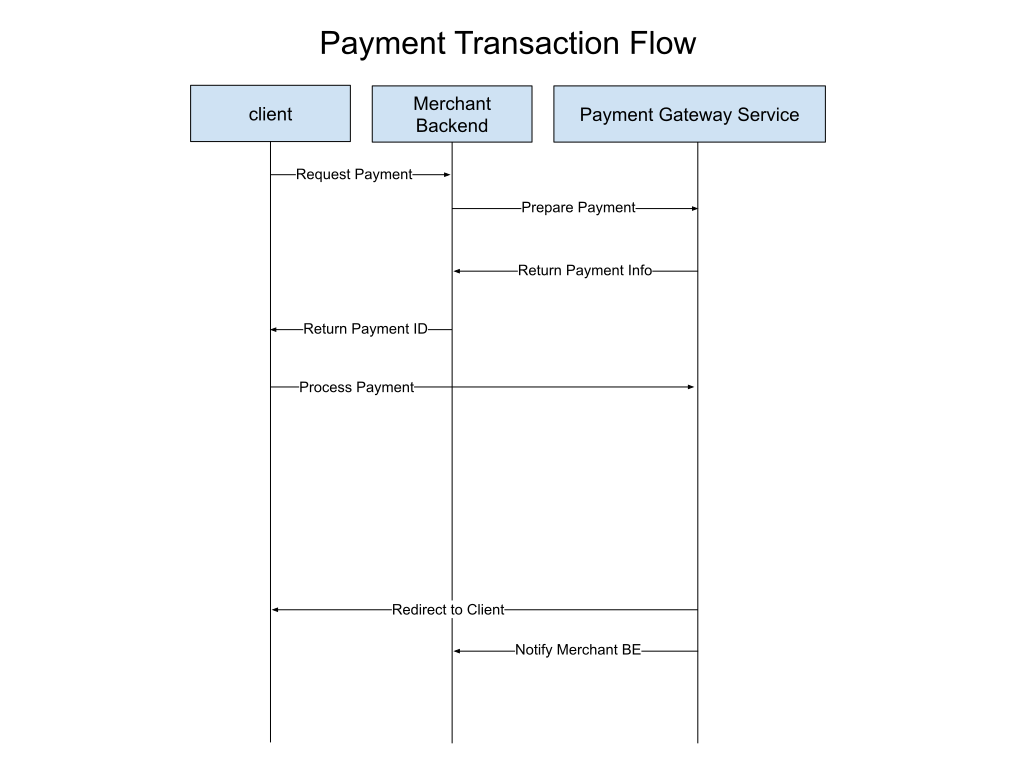
Creates a Payment Context which includes the essential information for initiating a payment.
Executing Payment (PCI-DSS Certified Merchants)
Processes a payment for PCI-DSS Certified Merchants using the Payment Token.
Payment Page (PCI-DSS Non-Certified Merchants)
Non-Certified merchants redirect customers to Payment Page URL where they can securely enter their payment details.
Test Environment Redirect URL
GET https://pay-test.alqaseh.com/pay/:request_token
Retrieve Payment Information
Retrieve the current status and details of a specific payment.
Webhook Notifications vs Redirect URLs
Webhook Notifications
Webhooks provide automated notifications to your server after a payment is processed. Once a payment is completed, the webhook URL specified during Payment Context creation receives a POST request with detailed information about the payment outcome. This server-to-server notification helps keep your system updated on the status of each payment, allowing you to take necessary actions (e.g., mark an order as paid or notify the customer).
Webhook Notification Details:
- amount (
float32): The total amount of the transaction. - currency (
string): The currency in which the transaction was made. - terminal_id (
string): Identifier for the terminal used for processing. - order_id (
string): Unique identifier for the order, provided by the merchant during Payment Context creation. - trtype (
enum.TransactionType): Type of transaction (e.g., Retail, Authorization). - rc (
string): Response code indicating the result of the transaction. - approval (
string): Bank approval code, if applicable. - rrn (
string): Retrieval reference number for the transaction. - p_sign (
string): The message authentication code (MAC) used to verify the data integrity. - nonce (
string): Random value for additional security. - timestamp (
string): Time when the transaction was processed. - payment_status (
enum.PaymentStatus): Status of the payment, such asSuccess,Failed, orPendingetc.
These details help you maintain consistency and visibility of each payment's lifecycle, providing reliable data for backend processes and ensuring accurate records for each transaction.
Redirect URLs
Redirect URLs are used to control the user experience after the customer completes a payment. The redirect URL is configured during the Payment Context creation and allows customers to be redirected to a specific page on your platform based on the result of their payment.
-
After payment is completed (success, failure, or cancellation), the customer is redirected to the specified redirect URL.
-
The URL includes three query parameters to inform your application of the payment status:
?payment_id=%v: A unique identifier for the payment.&order_id=%v: The order ID you provided during payment context creation.&status=%v: The status of the payment (Success,Failed, orPending).
This redirection allows you to manage the customer's experience smoothly by taking them to appropriate pages, such as a confirmation page for successful payments or an error page for failed payments.
Differences Between Webhooks and Redirects
| Aspect | Webhook Notification | Redirect URL |
|---|---|---|
| Purpose | To notify your backend system about the payment status. | To guide the customer to a specific page post-payment. |
| Interaction | Server-to-server (automated, backend). | Client-side (through customer’s browser). |
| Details Returned | Detailed transaction data: amount, currency, order_id, trtype, rc, etc. | Basic status with payment_id, order_id, status. |
| Where Configured | During Payment Context creation (webhook_url field). | During Payment Context creation (redirect_url field). |
Summary
- Use Webhook Notifications to automatically update your backend with payment details such as
amount,currency,approval,status, etc. - Use Redirect URLs to enhance the user experience by redirecting customers to appropriate pages after payment completion, with the transaction status provided as query parameters.
Both webhook URL and redirect URL play essential roles in providing a smooth payment experience and in keeping your backend and customer interface synchronized.
Retry and Revoke Payments
Retry Payment
Retrying a Payment is useful for transactions that have not been successfully completed. You can retry payments in the following statuses:
- Expired: The payment context has expired without successful processing.
- Declined: The payment was explicitly declined.
- Failed: An error occurred during the transaction.
- Unknown: The status of the transaction is uncertain or undefined.
When you initiate a retry, the payment token and payment ID are regenerated, giving the transaction a fresh start. Additionally, the status of the payment is changed to retried.
Details:
- Status Updated To:
retried - New Token and Payment ID: A new
payment_tokenandpayment_idare generated to facilitate the retry attempt.
This process allows previously unsuccessful payments to be reattempted, offering flexibility to customers who may have encountered issues such as connectivity problems or insufficient funds during the initial attempt.
Revoke Payment
Revoking a Payment is used to cancel a payment before it is successfully completed. You can revoke payments that are in the following statuses:
- Prepared: The payment context has been created but the payment has not yet been processed.
- Retried: The payment has previously been retried but has not yet succeeded.
When a revoke request is made, the payment token is regenerated, and the payment status is updated to revoked. Revoking a payment means that no further attempts will be made to process the transaction, effectively terminating it.
Details:
- Status Updated To:
revoked - New Token: A new
payment_tokenis generated as part of the revocation process.
Revoking a payment provides merchants the ability to cancel incomplete payment attempts proactively, especially when a transaction is no longer required or has exceeded its utility.
Summary of Transaction Statuses
The following are all possible statuses for transactions managed via Al Qaseh Payment Gateway:
- prepared: Payment context has been created and is ready for processing.
- revoked: Payment has been canceled, no further action will be taken.
- failed: Payment attempt failed due to an error.
- retried: A previous failed or expired transaction has been retried.
- succeeded: Payment has been successfully processed.
- expired: Payment context expired without completion.
- duplicated: Payment detected as a duplicate and was not processed.
- declined: Payment was explicitly declined.
- unknown: Payment status is unknown due to an unexpected issue.
By utilizing the retry and revoke functionalities, you can efficiently manage transactions that require either further attempts or cancellation, ensuring flexibility and control over the payment lifecycle.